
UMTv2/UMTPro QcFire v12.2

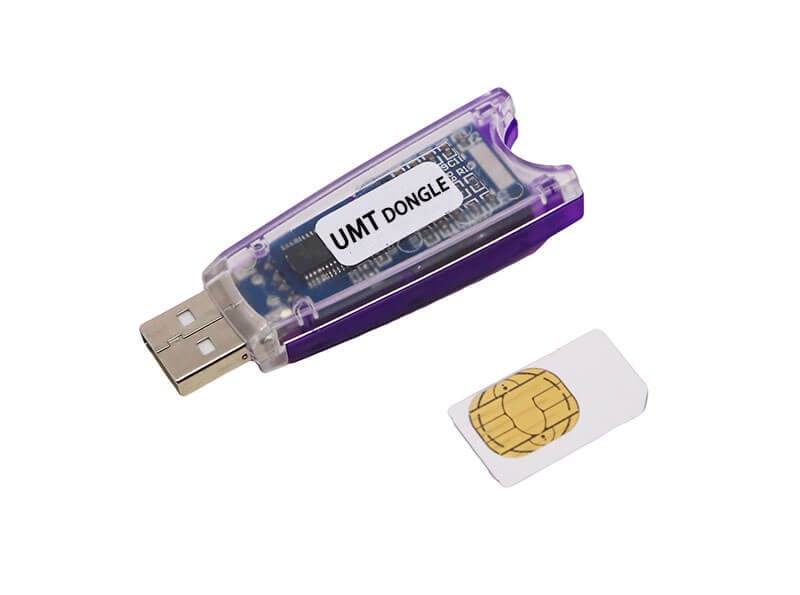
UMTv2/UMTPro QcFire v12.2
للتفعيل For Activation From here من هنا
Supported Functions
– Read / Write Firmware
– Backup / Restore QCN
– IMEI Repair in FTM/Diag + Flash Mode
– Backup / Reset / Restore Security (EFS)
– Reset FRP (Google Factory Reset Protection)
– Format UserData
– Read Pattern Lock (Android < 6.0, Un-Encrypted Devices Only)
– Reset Locks (PIN, Password, Pattern w/o Data Loss, Un-Encrypted Devices Only)
– Enable Diag (Need OEM Unlock, May not work on BL Locked Devices)
– Reboot to EDL from Fastboot
– Reset Mi Account for Xiaomi Devices
– Disable Mi Account for Xiaomi Devices
– Factory Reset (sideload Mode) for Xiaomi Devices
– Disable / Restore Locks for Encrypted Userdata
– Motorola Boot Repair
– Xiaomi EDL Locked Device Service
– Bootloader Unlock in EDL Mode for some Xiaomi Devices
– One Click Root in EDL Mode for Generic Qualcomm Devices
– Forensic Functions (Read Contacts / Messages in EDL Mode)
– One Click Lock Reset for Vivo Phones (Encrypted Userdata)
– Factory Method for Format FS
– EDL Authentication using Xiaomi Auth App (Service Account Required)
– Xiaomi Wipe EFS in Sideload Mode
– Xiaomi IMEI Repair for RSA Protected Phones
– Xiaomi Boot Loader Unlock
– Unique Method for Vivo Reset Locks for Protected Devices
– Xiaomi EDL Auth Using UMT Server
– Xiaomi Flashing in Fastboot Mode
– Nokia Factory Firmware (nb0) Direct Flashing in EDL mode
– Oppo OFP Firmware Exctration Added
– Xiaomi Free Auth Service (bypass).
– Mi Account Reset without Relock
– Mi Account Patch on Flashing (EDL/Fastboot)
– Samsung MDM Unlock in EDL Mode
– Huawei ID Reset
– Vivo Functions in Fastboot Mode
– Universal Huawei ID Reset
– Xiaomi Sideload Reset FRP/Mi Account
– Xiaomi Sideload Firmware Update
– Xiaomi Temporary BL Unlock
– Xiaomi Enable Diag (NO ROOT)
– Samsung Lost Mode Reset in EDL Mode
– Samsung KG Bypass
– Samsung Unbrick / Dead Boot Repair
– Samsung TAR to Unbrick Firmware Creator
– Xiaomi Auth Bypass For Newer Devices
What’s New:
Huawei
– Honor 80 (ANN-AN00A)
– Honor 80 Pro (ANB-AN00A)
– Honor 80 Pro (ANP-AN00)
Lenovo
– Legion Y700 2025 (TB321FU) ZUI_17.0.10
Motorola
– moto g(6) plus (evert)
Samsung
– Galaxy A23 (SM-A235M) BIT-B
– Galaxy A23 5G (SM-S236DL) BIT-C
– Galaxy A52 (SM-A525F) BIT-4
– Galaxy M55 5G (SM-M556E) BIT-4
– Galaxy S21 5G (SM-G991U) BIT-F
– Galaxy S21 Ultra 5G (SM-G998U) BIT-F
– Galaxy S21+ 5G (SM-G996U) BIT-G
– Galaxy S22 Ultra (SM-S908N) BIT-7
– Galaxy S22+ 5G (SM-S906N) BIT-7
– Galaxy Tab S6 10.5 (SM-T867U) BIT-A
– Galaxy Tab S8 Ultra 5G (SM-X906C) BIT-9
– Galaxy Z Flip4 (SM-F721B) BIT-3
– Galaxy Z Fold3 5G (SM-F926B) BIT-C
– Galaxy S22 5G (SM-S901J) BIT-1
ZTE
– RedMagic 9 Pro Plus 5G (NX769J)
– nubia Red Magic 10 Pro (NX789J)
– nubia Red Magic Nova (NP03J)
– nubia Red Magic Tablet (NP01J)
– nubia Z60 Ultra (NX721J) Android 15
New loaders added to database
CONNECTION METHOD FOR SAMSUNG:
Method to connect some Samsung Devices is already in Log.
For newer devices, do the following:
– Hold VOL UP + DOWN on Device.
– Hold Button on EDL Cable.
– Insert Cable to Device while holding EDL Cable Button.
– Now rapidly click both VOL UP + DOWN at the same time.
– Once you have clicked VOL UP + DOWN more than 3 times, leave EDL Cable Button but keep rapidly clicking VOL UP + DOWN.
– Stop clicking VOLUME Buttons once device is connected in EDL Mode.

 Telegram Channel
 WhatsApp Channel
 Facebook Page
 YouTube Channel