
Root Redmi 9C using Magisk without TWRP

اخلاء مسؤولية | DISCLAIMER
Unlock Redmi 9C Bootloader
Download Redmi 9C Firmware and save it on your PC. Your Current OS version and Downloaded Version should be the Same
Extract the files boot.img Vbmeta.img
Copy boot.img file to your mobile
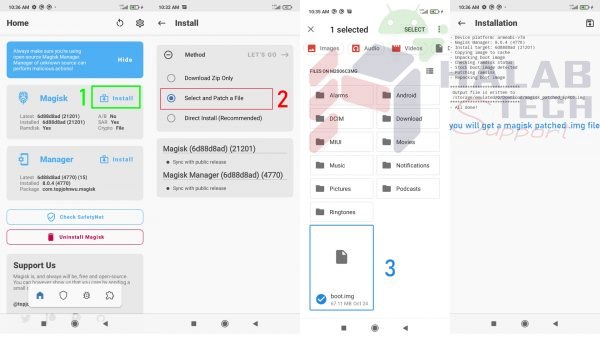
Copy the magisk_patched.img file to your PC. Rename the file to boot.img again
Flash Patched Boot Image and Vbmeta Image using ADB and Fastboot
Switch TO Fastboot mode
fastboot –disable-verity –disable-verification flash vbmeta vbmeta.img
fastboot erase cache
fastboot flash boot boot.img
fastboot reboot
Done


 Telegram Channel
 WhatsApp Channel
 Facebook Page
 YouTube Channel