
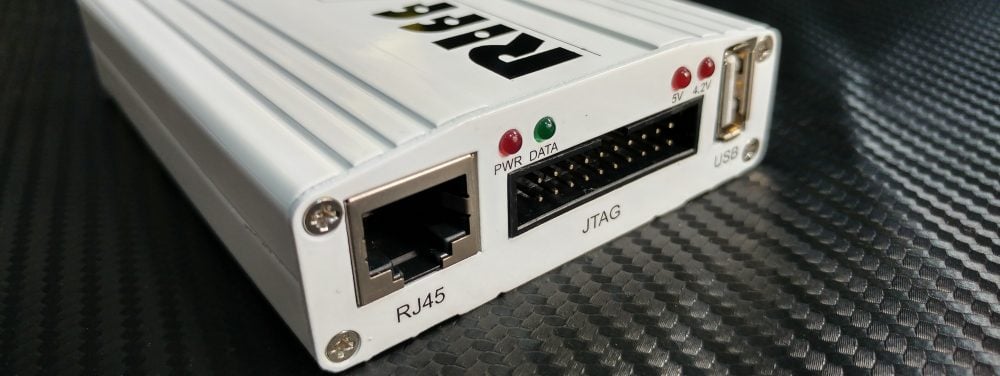
RIFF Box v1/v2 updates – MTK, SPD, Samsung fw files

اخلاء مسؤولية | DISCLAIMER
RIFF Box eMMC Plugin 4.11 – Samsung TAR/MD5/PIT , MTK Scatter and Spreadtrum PAC support added
RIFF Box eMMC Partition Table FullFlash Image Files Processing Plugin (eMMCDiskPartitions.dll) v4.11
————————————-
– Added support for MTK Partition Table Version 1.1 (BMTPOOL)
– Main Menu is added to the top of the Main Window. Main purpose to specify shortcut keys.
– Added option to parse standalone Samsung PIT Files: for this just select the *.pit file as you do when selecting a local dump file and click “Parse Local Dump File”
– [Load Firmware Files]: added option to directly load the Samsung PIT Files (*.pit) – in this case after pit is loaded, the plugin browses PIT file’s folder and loads partitions for which there are files present;
– [Load Firmware Files]: added option to directly load the GPT (MBR) binary block (*.bin) – in this case, if GPT/MBR is recognized and parsed, the plugin browses the file’s folder and loads partitions for which there are files with identical to partitions names present (extention is not relevant);
– [Load Firmware Files]: added support for Samsung TAR Firmware files (*.tar, *.tar.md5)
– [Load Firmware Files]: added support for Spreadtum PAC Firmware files (*.pac)
– [Load Firmware Files]: When building partitions layout from Spreadtrum PAC Files, the SPLLOADER partiton (with Boot Partiton1 as target destination) is automatically added to the list, and SPL_Loader data (if present in the *.pac file) is injected into it;
– [Load Firmware Files]: old format of MTK Scatter Files is supported.
– [Load Firmware Files]: added option to load partitions from MTK Scatter File
You can choose either parse partitions from alive device/dump and then user Scatter File to load firmware files into partitions, or immediately create partitions list from Scatter File. In this case
it is required to select two parameters, which match real eMMC chip’s: Boot Partition size and RPMB Partition size
– [Load Firmware Files]: Supported MTK Firmware’s Container “BFBF”: When loading firmware file packed inside of “BFBF” container, plugin automatically extracts the data from the container file and injects it into partition;
– [Load Firmware Files]: Supported Android Sparse Image Files Format: When loading Sparse Image, plugin automatically unpacks it and injects unpacked data into partition;
– [Load Firmware Files]: When loading MTK’s PRELOADER into Boot Partition1, the 0x800-byte Mediatek’s PRELOADER_HEADER is automatically generated, preloader file is appended to the header, and then the result is injected into boot partition;
– [Load Firmware Files]: When loading MTK’s PGPT into PGPT Partition and if the PGPT parition base is 0x00, the 0x200-byte standard MBR Sector is automatically generated, PGPT file is appended to the MBR Sector, and then the result is injected into PGPT partition;
– Inject data into partition: Partition ‘Fill-up’ percentage is recalculated using size of currently injected file.
For example if partition size is 2MB, and injected file is 1MB, then partition fill-up percentage will be recalculated to 50%.
This will allow to flash this partition back to phone using only injected size, without flashing un-needed remaining partition’s data.
This option is handly when flashing offical firmwares, when multiple paritions are injected with firmware data. Thus there will be no need to flash unnecesarry remnants
– changed “Load Layout from File” button caption to “Parse Local Dump File”;
– changed “Load Layout from Device” button caption to “Parse Connected eMMC”;
– changed “Load Firmware Files” button caption to “Parse Official Firmware”;
– added “Re-parse by Scatter File” button – this options allows to discard any partitioning of curretly parsed Local Dump or Connected eMMC Chip, and apply new addresses of partitions from external Scatter File (as well there are more options to use other files with partition layout descriptions)
This option is handy if plugin is unable to parse partitions due to unknown format of memory contents: it is possible to create own scatter file with description of partitions (names, addresses and sizes) and apply it with “Re-parse by Scatter File” button to the unrecognized dump.
Please note, this option expects the Mediatek (MTK) Scatter File format, but can be applied to any non-recognized (non-supported) dump – no matter of the dump’s source SoC (Qualcomm, Exynos, Spreadtrum, Mediatek, etc.)
– [Re-parse by Scatter File]: added option to re-parse partitions using a standalone MTK Layout’s __NODL_PMT Binary File
– [Re-parse by Scatter File]: added option to re-parse partitions using a standalone MTK Layout’s BMTPOOL Binary File
RIFF Box updates, 26.06.2018
New models boot repair, ISP pinout, Read/Write eMMC
- Acer B1-730HD
- Alcatel OT5044D
- Archos 70 Xenon Color
- Artel Artel Adi5
- Artel Artel NOVA
- Huawei MediaPad T1 (T1-701U)
- Lenovo A2020a40
- Lenovo S860
- Lenovo S2110
- LG D700
- LG D820
- LG H343
- LG H700
- LG VS425PP
- Micromax E313
- Micromax Q415
- Nokia 3 (TA-1032)
- Nokia Lumia 820 (RM-825)
- Samsung G350E
- Samsung G361F
- Samsung I9060M
- Sony E5603
- ZTE A452
- ZTE L5 Plus
Pinouts updates
- Asus Z00A (ZE550ML)
- Asus ZenFone2 (ZE551ML)
To download and install updates, click “Check for Updates” button on “Box Service” tab
You can also register an account at Turbo-Support download server
Index of ../../RIFF/RIFF_ROOT/
RIFF Box Firmware 1.50
—————————
– Fixed RIFFBOX2 Firmware bug: when reading any data from eMMC Chip, the Data CRC16 was not checked, so even data received with errors was considered to be valid.
Now RIFFBOX2 Firmware detects data CRC16 errors, and guarantees data read from eMMC chip is valid.
RIFFBOX1 Firmware is not affected by this bug, but firmware update is required to update to 1.50 version string.
– Fixed timing bug which prevented to change BOOT and RPMB partitions sizes
RIFF Box JTAG Manager 1.79
—————————
– Added context menu for the PKG editor – right-click on data write actions allows to perform alignment of the selected ation’s data. Normally alignment is performed when adding new write memory action.
This feature allows to align actions in selectable manner, after all write actions were added to the list. This feature is handy when adding full list of write actions via eMMC Plugin,
and when some partitions are required to remain full size, and others are allowed to be cut/aligned
– “eMMC/SD Access” Page -> “Data Length” Field, ComboBox with pre-set lengths, ‘File Size’: when selected, Data Length field is filled with value equal to selected File’s size.
Now File size is automatically aligned to 0x200. JTAG Manager automatically handles non-aligned to 0x0200 files – the remaining data is filled with 00s.
– Added “Load EXT_CSD Register” feature to the eMMC/SD Advanced dialog. It is possible now to load 0x200-byte EXT_CSD register into currently connected eMMC context;
Format supported: plain binary format, 0x200 bytes size of file; most often these are files with extentions ‘*.bin’ and ‘*.extcsd’;
– Added “Load CID & CSD Registers” feature to the eMMC/SD Advanced dialog. It is possible now to load CID and CSD registers into currently connected eMMC context;
Format supported: log text files made with other boxes.





 Telegram Channel
 WhatsApp Channel
 Facebook Page
 YouTube Channel