
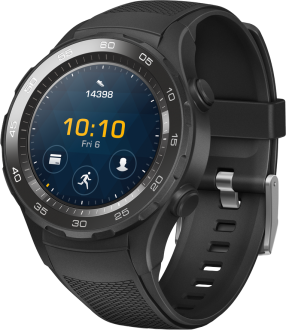
فلاشة لغة إنكليزي و تركي Huawei Watch 2 LEO-DLXX ENGLISH AND ARABIC FIRMWARE


اخلاء مسؤولية | DISCLAIMER
بسم الله الرحمن الرحيم
السلام عليكم ورحمة الله وبركاته
في هذا المقال سنشرح طريقة تفليش ساعة Huawei Watch 2 LEO-DLXX
-أولا يتوجب التنبيه بأن الساعة تحمل نظام Android Wear حيث أن هذا النظام لا يدعم اللغة العربية أو الفارسية…
-هذا الحل سيقوم بعمل ضبط مصنع للساعة…
-هذا الحل سيقوم بفتح البوتلودر و سيفقدك الضمان…
أولا نقوم نقوم بإدخال الساعة لوضع فاستبوت عن طريق الضغط باستمرار على زر التشغيل إلى حين اشتغال الرجاج عندها نقوم بإزالة الضغط عن الزر ثم الضغط ضغطة سريعة… بعدها نقوم بتوصيل الساعة وكتابة الأمر التالي لفك البوتلودر:
fastboot oem unlock
ثم إعادة الدخول لوضع فاستبوت وتوصيل الساعة وتشغيل STEP1 …
بعد الانتهاء نقوم بإدخال الساعة لوضع الريكفري عن طريق الضغط على زر التشغيل ضغطة سريعة لاختيار الوضعية المراد الدخول إليها والتي تظهر بالكتابة الحمراء
ثم الضغط باستمرار للدخول للوضعية المرادة… بعد الدخول لوضع الريكفري نقوم بتوصيل الساعة من جديد ثم تشغيل سكريبت STEP2 والانتظار لحين الانتهاء
ستكون عملية التفليش قد انتهت مبارك عليك
في حال دخول الساعة لوضع الريكفري بشكل تلقائي نقوم بتوصيلها وتشغيل STEP3
لتحميل الملفات من هنا
اتمنى ان يكون المقال قد نال على اعجابكم وشكرا لحسن قرائتكم
والسلام عليكم ورحمة الله وبركاته
Peace, mercy and blessings of God
In this article, we will explain how to flash Huawei Watch 2 LEO-DLXX
-First of all, it should be noted that the watch carries the Android Wear system, as this system does not support the Arabic or Farsi language…
This solution will do a factory reset of the watch…
This solution will unlock the bootloader and lose the warranty…
First, we enter the watch into fastboot mode by pressing power button until the vibrator works, then we release power button and then press a quick press… Then we connect the watch and write the following command to unlock bootloader:
fastboot oem unlock
Then re-enter the device to Fastboot , connect the watch, and press on Step1…
After completion, we enter the watch into recovery mode by pressing power button, a quick press to choose the mode you want to enter, which appears in red color
Then press and hold to enter the desired mode… After entering the recovery mode, we connect the watch again, then run the STEP2 script and wait for it to finish
The flashing process will be over, congratulations
If the watch enters recovery mode automatically, we connect it and run Step3
Download files from here
best regards from halabtech team


 Telegram Channel
 WhatsApp Channel
 Facebook Page
 YouTube Channel