
(Merlin) Fix Baseband IMEI Xiaomi Redmi Note 9


اخلاء مسؤولية | DISCLAIMER
(Merlin) Fix Baseband IMEI Xiaomi Redmi Note 9
All the information on this website – https://www.halabtech.com – is published in good faith and for general information purpose only. HalabTech does not make any warranties about the completeness, reliability and accuracy of this information. Any action you take upon the information you find on this website (HalabTech), is strictly at your own risk. HalabTech will not be liable for any losses and/or damages in connection with the use of our website.
From our website, you can visit other websites by following hyperlinks to such external sites. While we strive to provide only quality links to useful and ethical websites, we have no control over the content and nature of these sites. These links to other websites do not imply a recommendation for all the content found on these sites. Site owners and content may change without notice and may occur before we have the opportunity to remove a link which may have gone ‘bad’.
Please be also aware that when you leave our website, other sites may have different privacy policies and terms which are beyond our control. Please be sure to check the Privacy Policies of these sites as well as their “Terms of Service” before engaging in any business or uploading any information.
The finall solution Redmi Xiaomi Note 9 & Redmi 10X 4G merlin baseband unknown
This solution for global version locked and unlocked bootloader
Review all the articles of your favorite site, HalabTech, and resort to this solution as a last:1
resort, because it is necessary to warn that the device should not be updated permanently
The IMEI and the baseband version will not be permanently lost unless the device is updated
Second: If you have enough time, update . But if the baseband version is lost, you must repeat the work because
every rule has an exception and every device has its own merits
NOW LET IS START
1-Download eng rom redmi note 9 eng firmware from here
2-download flash tool from here
3-download MTK_BYPASS_REV4 FROM HERE
now you must disable OEM and switch off the phone
and run mtk_bypass_rev4 and press start and press volume down and plug usb cable
you will see like this picture
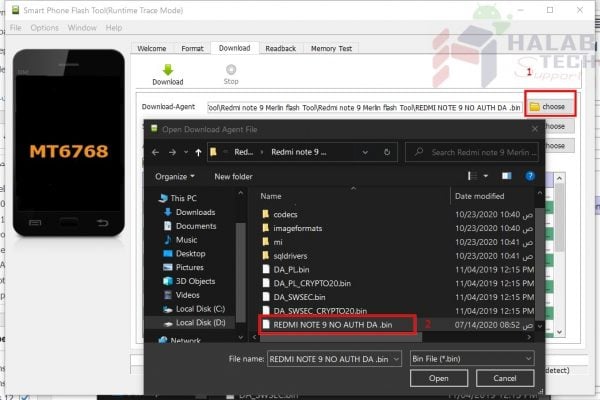
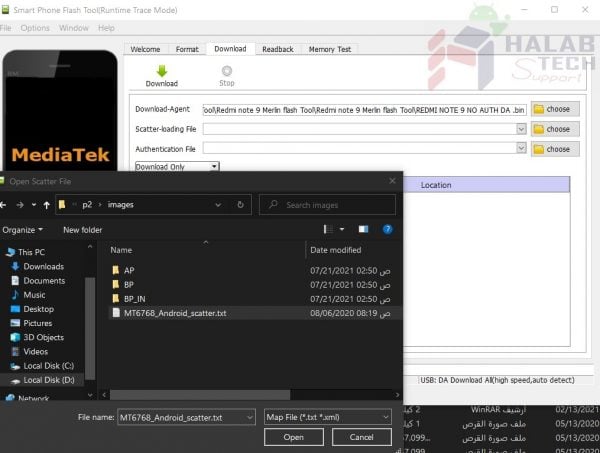
Now open REDMI NOTE 9 MERLIN FLASH TOOL and select file as the picture
and we extract eng firmware and select REDMI NOTE 9 ENG FIRMWARE
as in the picture
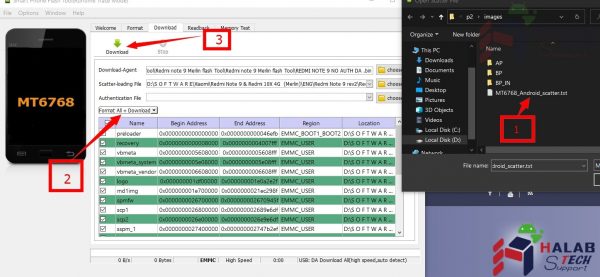
and we choose format+download as in the picture
now we finshed from flashing eng firmare
now we write importand file to restore imei and baseband (nvdata-nvram)
4-download nvdataand nvram and the cmd command from here or from here
Enter the phone in fastboot mode
We open a command prompt and type the existing commands copy-paste into the command prompt from the text
document attached to the files in step 4
We restart the phone after completion and make sure that the imei is back and the baseband is issued
If the process does not work, retype the commands in fastboot mode
Now we follow this video to learn how to write the imei number 2 exclusively. Follow the video from the 5th minute.
Disclaimer: the fifth minute
https://www.youtube.com/watch?v=whewGgQ1Ku0
Download the program used in the video from here
We restart the phone, make sure that the IMEI is there and check the network. If all goes well, we’re done with the
hard part
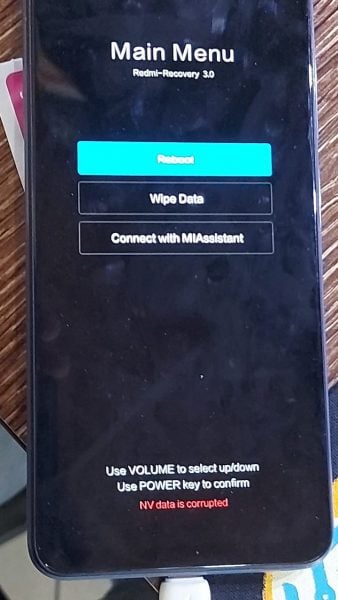
If you encounter the problem of NV data corruption
as in the picture
We format the following address using the sp flash tool
nvdata
0xc4a20000x4000000
nvram
0x19f000000x4000000
And we rewrite the second imei only via meta mod
5-now download last version firmware from here
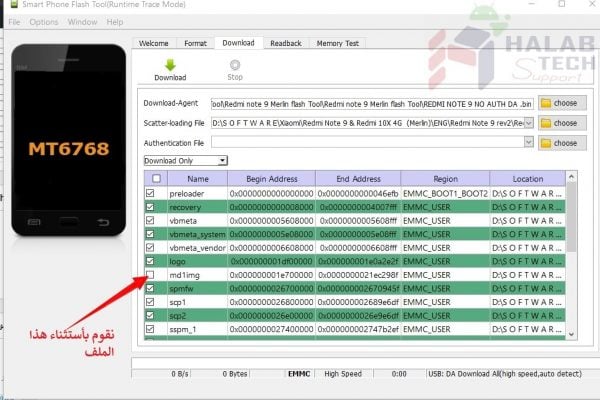
And we flash the same way used in flashing the developers ROM with a simple modification, which is to exclude the
md1img file as in the picture
We click on download and wait for it to finish, congratulations on restoring imei and baseband version




 Telegram Channel
 WhatsApp Channel
 Facebook Page
 YouTube Channel
Xiaomi Redmi K40 Gaming Edition