Peace be upon you and Allah’s mercy and blessings
God bless you who follow Halabtech site
We offer you a way to fix imei for
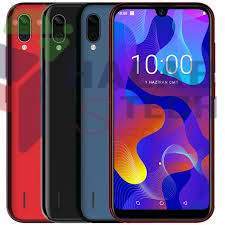
Casper VIA E3 without boxs
First of all , you must activate the OEM option.
Then you have to download the script and the web file from here.
Then connect the device to PC in FASTBOOT mode
In order to unlock bootloader , you must run the script.
” UNLOCK BOOTLOADER.bat”
from here
/It will make formatting for the device/ Then you have to reconnect the device to PC in FASTBOOT mode again.
And you must run the script.
FASTBOOT ERASE NV.bat
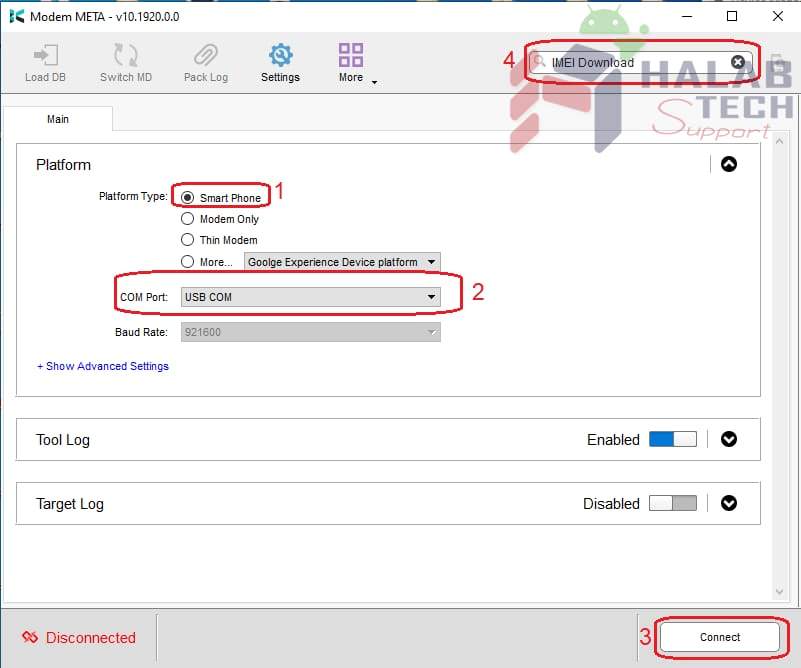
Then we do imei repair with MauiMeta.
To download the tool press here
Finally, you have to run the tool, turn off the device, reconnect it to the computer, and tick all the choices as it is shown in the picture. Then you have to choose the option “from file” and choose the file that we have downloaded and write the first and second imei numbers , then choose write button and disconnect.
After all we can say congratulations for imei fixing. HalabTech Team





 Telegram Channel
 WhatsApp Channel
 Facebook Page
 YouTube Channel